
Right360 StartPage

Loading...

Start Pages: Social

The following Social sources can be added to your customized StartPage for quick access.
Right360 StartPage

Right360 .Social

Right360.social is a consolidated feed of multiple social feeds.

Truth Social

Truth Social

Site is social media site.

Gettr Social

GETTR

Site is social media site.

MeWe Social

MeWe

Site is social media site.

LinkedIn Social

Linked In

Site is social media site.

Facebook Social

Facebook

Site is social media site.

Facebook Messenger Social

Facebook Messenger

Site is social media site.

X Social

Twitter (X)

Site is social media site.

Instagram Social

Instagram

Site is social media site.

Pinterest Social

Pinterest

Site is social media site.

Ancestry Social

Ancestry

Site is social media site.

My Heritage Social

My Heritage

Site is social media site.

Classmates Social

Classmates

Site is social media site.

Next-door Social

Nextdoor

Site is social media site.

Church Finder Social

Church Finder

Site is social media site.

Signal Social

Signal

Site is social media site.

Discord Social

Discord

Site is social media site.

Skype Social

Skype

Site is social media site.

WhatsApp Social

WhatsApp

Site is social media site.

Zoom Social

Zoom

Site is social media site.

Badoo Social

Badoo

Site is social media site.

eHarmony Social

eHarmony

Site is social media site.

Farmers Only Social

Farmers Only

Site is social media site.

Twoo Social

Twoo

Site is social media site.

Meetup Social

Meetup

Site is social media site.

Flickr Social

Flickr

Site is social media site.

Imgur Social

Imgur

Site is social media site.

Chrome: Set HomePage/StartPage

The following Instructions are intended for the Chrome Browser.

Chrome Quick Set

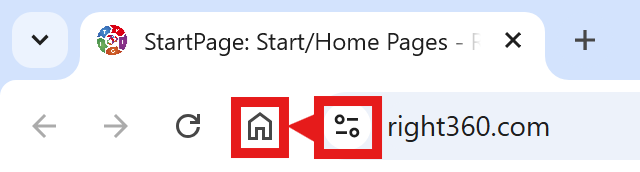
Chrome-Drag-URL-to-Home-Icon
  1. Drag/Drop

CAVEAT: Many browsers are hiding this option to keep you on their chosen site. The Video will cover how to get your Homepage Button/Icon back.

Chrome Video

Chrome Step-by-Step

With the Chrome Browser Open, perform the following:

  1. Upper Right Corner, Find/Select the Options Button/Icon (3-dots),  Slide down to Find/Select “Settings“.
  2. On the left menu, select “Appearance”.  Toggle the “Show home button”. In the “Open a specific page or set of pages”. Click “Add a new page” and enter: Right360.com or enter your customized Right360.com/URL. Click Save.