






Right 360 is intended to be an alternate Home/Portal/Start Page. Right 360 provides multiple conservative solutions via multiple domains to provide separations of content, such as:
Right360.com is our Start Page / Search Engine. Results are user submitted and hand selected sites.
Right360.news contains consolidated Conservative News Feeds; updated @ 10-minutes.
Right360.social provides consolidated Social Feeds updated as detected.
Right360.blog providing Conservative Discussion Forums for users of Right 360.
The following Instructions are intended for the Chrome Browser.
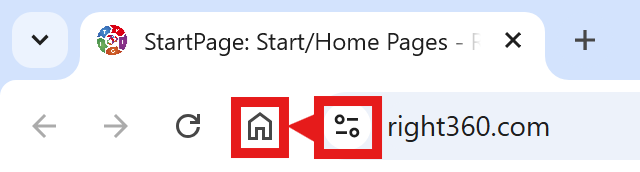
CAVEAT: Many browsers are hiding this option to keep you on their chosen site. The Video will cover how to get your Homepage Button/Icon back.
With the Chrome Browser Open, perform the following: