DuckDuckGo and Startpage are both privacy‑focused search engines, but they take different routes to protect your data. DuckDuckGo uses a mix of its own crawler and Bing results, while Startpage delivers Google results without tracking. This comparison explains how each engine handles privacy, neutrality, political filtering, and which one offers the most secure and censorship‑free experience.
Strongest privacy protections of any mainstream engine
Uses Google’s massive index anonymously
Consistent, high‑quality results
Ideal for users who want Google accuracy without Google surveillance
⭐ Why Choose Startpage Over DuckDuckGo
Startpage is the better choice if you want:
Google‑level accuracy without Google tracking
The strongest privacy model (no logs, no IP storage, no profiling)
A search engine that never touches your personal data
Consistent, high‑quality results for every query
Startpage is the closest thing to “Google, but private.”
⭐ Why Choose DuckDuckGo Over Startpage
DuckDuckGo is the better choice if you prefer:
A fully independent brand with its own crawler
A simple, lightweight interface
A privacy‑focused engine that avoids Google entirely
A search experience not tied to Big Tech indexes
DuckDuckGo is ideal for users who want privacy and want to avoid Google’s ecosystem completely.
⭐ The Right360 Advantage
Different searches need different engines. Right360 gives you:
Startpage for Google‑quality results without tracking
DuckDuckGo for a clean, independent, Big‑Tech‑free experience
Instant switching between 20+ search engines
A single StartPage that adapts to your privacy needs
You’re no longer locked into one search engine — you choose the best tool for each search.
Right Search Engines
Top 1% Conservative Sites
Top Conservatives
Conservative Sources
Conservative Links/Sites
Customizable/Sharable
A Living Network of Stunning Sources
You are a part of something big; when users, just like you, find Right leaning Search Engines, the cream of the crop, they suggest it for inclusion to our database. The top Search Engines are added to our Start Pages for easy access.
The following Instructions are intended for the Chrome Browser.
Chrome Quick Set
Drag/Drop
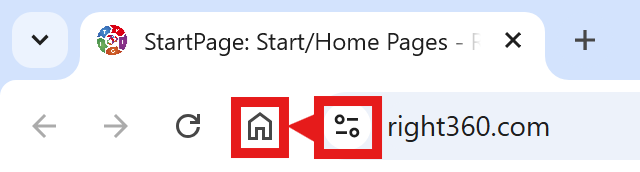
CAVEAT: Many browsers are hiding this option to keep you on their chosen site. The Video will cover how to get your Homepage Button/Icon back.
Chrome Video
Chrome Step-by-Step
With the Chrome Browser Open, perform the following:
Upper Right Corner, Find/Select the Options Button/Icon (3-dots), Slide down to Find/Select “Settings“.
On the left menu, select “Appearance”. Toggle the “Show home button”. In the “Open a specific page or set of pages”. Click “Add a new page” and enter: Right360.com or enter your customized Right360.com/URL. Click Save.